Showing posts with label innovatie. Show all posts
Showing posts with label innovatie. Show all posts
Friday, 23 August 2013


Wednesday, 19 January 2011
Lijst van handige hulpjes (sites)

- 280slides.com – create beautiful presentations, access them from anywhere, and share them with the world
- alertful.com – quickly setup email reminders for important events
- animoto.com – assembles stunning slideshows
- aviary.com/myna – an online audio editor that lets record, and remix audio clips online
- awesomehighlighter.com – easily highlight the important parts of a web page
- bing.com/images – automatically find perfectly-sized wallpapers for mobiles
- bounceapp.com – for capturing full length screenshots of web pages
- boxoh.com – track the status of any shipment on Google Maps
- bubbl.us – create mind-maps, brainstorm ideas in the browser
- buzzfeed.com – never miss another Internet meme or viral video
- chipin.com – when you need to raise funds online for an event or a cause
- citrify.com – supplies quick photo-editing tools
- copypastecharacter.com – copy special characters that aren’t on your keyboard
- coralcdn.org – if a site is down due to heavy traffic, try accessing it through coral CDN
- crimson room – Takagi’s cultish puzzle game
- cutmp3.com – trims any song to ringtone length
- dabbleboard.com – your virtual whiteboard
- dingitsup.com – alerts you via SMS, twitter or email when a website goes down or comes back up
- disposablewebpage.com – create a temporary web page that self-destruct
- downforeveryoneorjustme.com – find if your favourite website is offline or not
- dropbox.com – gives 2GB of storage and syncs files
- droolr.com – lists the hottest gadgets
- e.ggtimer.com – a simple online timer for your daily needs
- encrypted.google.com – prevent your ISP and boss from reading your search queries
- errorlevelanalysis.com – find whether a photo is real or a photo-shopped one
- eventful.com – lists happenings in your area
- evernote.com – captures ideas, notes, or audio
- everytimezone.com – a less confusing view of the world time zones
- example.com – this website can be used as an example in documentation
- faxzero.com – send an online fax for free
- fb.me/AppStore – search iOS app without launching iTunes
- feedmyinbox.com – get RSS feeds as an email newsletter
- filleritem.com – digs up useful but cheap items on Amazon for meeting the free-shipping amount
- flightaware.com – live flight tracking service for airports worldwide
- flightstats.com – track flight status at airports worldwide
- followupthen.com – setup quick reminders via email itself
- fontsquirrel.com – a good collection of fonts – free for personal and commercial use
- formspring.me – you can ask or answer personal questions here
- gasbuddy.com – reports current local fuel prices
- genbook.com – allows clients to schedule appointments with your company
- ge.tt – quickly send a file to someone, they can even preview it before downloading
- goo.gl – shorten long URLs and convert URLs into QR codes
- google.com/dictionary – get word meanings, pronunciations and usage examples
- google.com/history – found something on Google but can’t remember it now
- grooveshark.com – provides diverse music and social features in a slick interface
- gtmetrix.com – the perfect tool for measuring your site performance online
- hackaday.com – serves up fresh hacks (short tutorials) every day from around the web and one in-depth ‘How-To hack’ guide each week
- historio.us – preserve complete web pages with all the formatting
- homestyler.com – design from scratch or re-model your home in 3D
- howjsay.com – talking dictionary of English pronunciation
- huddle.net – helps your workgroup manage projects, and offers online storage
- humyo.com – provides 10GB of free storage
- iconfinder.com – the best place to find icons of all sizes
- imo.im – chat with your buddies on Skype, Facebook, Google Talk, etc. from one place
- isendr.com – transfer files without uploading to a server
- isnsfw.com – when you wish to share a NSFW page but with a warning
- iwantmyname.com – helps you search domains across all TLDs
- jobspice.com – generates attractive online resumes
- join.me – share you screen with anyone over the web
- joliprint.com – reformats news articles and blog content as a newspaper
- kuler.adobe.com – get colour ideas, also extract colours from photographs
- librophile.com – offers downloadable audiobooks
- livecage.com – allows live audio and video streaming
- livestream.com – broadcast events live over the web, including your desktop screen
- lmgtfy.com – when your friends are too lazy to use Google on their own
- localti.me – know more than just the local time of a city
- logmein.com – gives you remote access to your PCs
- lovelycharts.com – create flowcharts, network diagrams, sitemaps, etc
- mailvu.com – send video emails to anyone using your web cam
- measy.com – gives quizzes to narrow down choices
- memorari.com – reminds you of your important dates by sending out quick notices to your mobile/email/im handle
- mesh.com – syncs files and gives remote access
- mint.com – syncs with your financial accounts to help you monitor your budget
- mywot.com – check the trust level of any website
- namemytune.com – when you need to find the name of a song
- noteflight.com – print music sheets, write your own music online
- nutritiondata.com – details the content of food at restaurants and in recipes
- nutshellmail.com – Get your Facebook and Twitter streams in your inbox
- office.com – download templates, clipart and images for your Office documents
- onlineocr.net – recognize text from scanned PDFs and images
- opentable.com – makes reservations at restaurants
- passpack.com – manages all of your online passwords
- pastebin.com – a temporary online clipboard for your text and code snippets
- pdfescape.com – lets you can quickly edit PDFs in the browser itself
- pearbudget.com – tracks your income and spending
- phonebooth.com – provides phone services
- picresize.com – online picture resizer
- pixorial.com – presents easy-to-use video-editing tools
- polishmywriting.com – check your writing for spelling or grammatical errors
- prezi.com – create astonishing presentations live and on the web
- printwhatyoulike.com – print web pages without the clutter
- privnote.com – create text notes that will self-destruct after being read
- proxify.com – gives you anonymous access to regionally blocked content
- random.org – pick random numbers, flip coins, and more
- regex.info – find data hidden in your photographs
- retailmenot.com – provides store coupon codes
- runpee.com – let’s you know when the best time is during a movie to go to the toilet
- screenr.com – record movies of your desktop and send them straight to YouTube
- scribblemaps.com – create custom Google Maps easily
- scr.im – share you email address online without worrying about spam
- seatexpert.com – shows the best seats on any flight
- seatguru.com – consult this site before choosing a seat for your next flight
- similarsites.com – discover new sites that are similar to what you like already
- sitorsquat.com – indicates the closest clean restroom
- sizeasy.com – visualize and compare the size of any product
- smart.fm – provides free online courses
- snapask.com – use email on your phone to find sports scores, read Wikipedia, etc
- snopes.com – find if that email offer you received is real or just another scam
- speedtest.net – assesses your Internet connection’s download and upload speeds
- springpadit.com – supplies templates for organizing your personal data
- spypig.com – now get read receipts for your email
- sxc.hu – download stock images absolutely free
- stickybits.com – links digital data to physical objects
- stupeflix.com – make a movie out of your images, audio and video clips
- sumopaint.com – an excellent layer-based online image editor
- syfy.com – everything sci-fi
- tabbloid.com – your favourite blogs delivered as PDFs
- tempalias.com – generate temporary email aliases, better than disposable email
- teuxdeux.com – groups your weekly tasks by date
- textflow.com – simplifies document collaboration
- thefind.com – ferrets out obscure products
- thesocialmediaguide.com.au – awesome blog on social media!
- timerime.com – create timelines with audio, video and images
- tineye.com – this is like an online version of Google Goggles
- tinychat.com – setup a private chat room in micro-seconds
- topicfire.com – aggregates news in topics you choose
- topsy.com – a better search engine for twitter
- translate.google.com – translate web pages, PDFs and Office documents
- truveo.com – the best place for searching web videos
- twitpay.com – lets you raise funds via Twitter
- tubemogul.com – simultaneously upload videos to YouTube and other video sites
- typingweb.com – master touch-typing with these practice sessions
- umbrella.com – tells you whether or not it’s umbrella carrying weather
- untiny.me – find the original URLs that’s hiding behind a short URLs
- urbandictionary.com – find definitions of slangs and informal words
- usestacks.com – organizes tasks by person and project
- valebrity.com – validates the authenticity of celebrities on social networks
- viewer.zoho.com – Preview PDFs and Presentations directly in the browser
- virustotal.com – scan any suspicious file or email attachment for viruses
- vocaroo.com – record your voice with a click
- wakerupper.com – makes calls to rouse or remind you
- warrick.cs.odu.edu – you’ll need this when your bookmarked web pages are deleted
- wetransfer.com – for sharing really big files online
- whatdoestheinternetthink.net – let’s you know what the internet thinks about something
- whatfontis.com – quickly determine the font name from an image
- whichdateworks.com – planning an event? find a date that works for all
- whisperbot.com – send an email without using your own account
- whoishostingthis.com – find the web host of any website
- wobzip.org – unzip your compressed files online
- wolframalpha.com – gets answers directly without searching
- woorank.com – everything you wanted to know about a website
- wordle.net – quick summarize long pieces of text with tag clouds
- yammer.com – gives workgroups a private microblog
- youtube.com/leanback – enjoy a never ending stream of YouTube videos in full-screen
- yypewith.me – work on the same document with multiple people
- zoho.com – offers a large variety of cloud-based apps
- zoom.it – view very high-resolution images in your browser without scrolling
Wednesday, 5 January 2011
Augmented media
Social media weergegeven binnen een videoclip. Is het een parodie of wordt het werkelijkheid?? Onze IPhones kunnen in de toekomst naast items in googlemaps ook mensen op straat herkennen en informatie die beschikbaar is over hen op het internet (hyves-, facebook en/of linkedinaccount) weergeven. Deze vorm van media (augmented) zal onze privacy nog meer nog meer onder druk gaan zetten.
Ik weet niet of ik dit nu wel wil. Maar er zullen wel applicaties komen om dit weer te blokken.
N'IMPORTE COMMENT - THE TOXIC AVENGER FEAT ORELSAN - "OFFICIAL VIDEO"
Ik weet niet of ik dit nu wel wil. Maar er zullen wel applicaties komen om dit weer te blokken.
N'IMPORTE COMMENT - THE TOXIC AVENGER FEAT ORELSAN - "OFFICIAL VIDEO"
Monday, 20 December 2010
Part 1 of the week of innovative thinking: Re-energising the Corporation - Jonas Ridderstrale ...
Ik ben al sinds 1999 geïnspireerd door Jona Ridderstrale. Destijds door zijn "Funcky Business" ideeën vandaar dat ik dit filmpje plaats. Helaas is het boek Funcky Business niet meer te koop maar ik raad iedereen aan het internet af te surfen naar de ideeën van deze man.
Succes ermee!
Re.M.I.
Monday, 8 November 2010
Eindelijk! Browser RockMelt draait om sociale netwerken
Social Media Browser
De traditionele browser voor het bekijken van websites heeft afgedaan. In de nieuwe browser RockMelt staan sociale netwerken centraal.
Het uitgangspunt van het bedrijf RockMelt en de gelijknamige browser is dat de internetgebruikers tegenwoordig hoofdzakelijk actief zijn binnen sociale netwerken zoals FaceBook en Twitter en daarnaast maar een klein aantal favoriete websites regelmatig bezoeken. Sterker nog, de nieuwe browser is alleen toegankelijk voor leden van FaceBook. Dat zijn er inmiddels zo’n 500 miljoen.

Browser vinding van Netscape-ontwikkelaarRockMelt is het geesteskind van Marc Andreessen, de man die eerder aan de wieg stond van Netscape. Samen met zijn investeringspartner Ben Horowitz leverde hij het leeuwendeel van RockMelts startfinanciering van 10 miljoen dollar. Andreessen zit zowel in de raad van commissarissen van RockMelt als die van FaceBook. De dagelijkse leiding van RockMelt laat hij over aan chief executive officer (CEO) Eric Vishria en chief technology officer (CTO) Tim Howes.
De gelijkenis tussen RockMelt en Chrome is groot. Een belangrijk verschil is de indeling van het scherm. RockMelt heeft kolommen, met uiterst links fotootjes van de favoriete FaceBook-contacten. In de rechterkolom staan pictogrammen van de favoriete websites (bookmarks) van de gebruiker, met een automatische melding als er updates op deze sites zijn gepubliceerd. Er is ook een zoekvenster voor Google.
Eigen profiel bij opstarten
Doordat RockMelt zich deels ‘in de cloud’ bevindt, heeft de gebruiker na het inloggen zijn eigen profiel inclusief voorkeursinstellingen, bookmarks en dergelijke op een willekeurige pc beschikbaar. Deze profielen worden op een centrale server opgeslagen. De browser zelf moet echter wel lokaal worden geïnstalleerd. RockMelt ondersteunt moderne webstandaarden als HTML5 en CSS3.
RockMelt is gebaseerd op Chromium, een opensourceproject dat op initiatief van Google is opgezet. Ook de browser Chrome en het besturingssysteem Chrome OS zijn van dit project afgeleid.
Alleen voor genodigdenVooralsnog is RockMelt alleen op uitnodiging – die online kan worden aangevraagd - beschikbaar. Andreessen streeft kennelijk niet direct naar een groot marktaandeel, want hij noemt in eerste instantie 1 miljoen gebruikers als streefaantal.
Bron: Automatiseringsgids
De traditionele browser voor het bekijken van websites heeft afgedaan. In de nieuwe browser RockMelt staan sociale netwerken centraal.
Het uitgangspunt van het bedrijf RockMelt en de gelijknamige browser is dat de internetgebruikers tegenwoordig hoofdzakelijk actief zijn binnen sociale netwerken zoals FaceBook en Twitter en daarnaast maar een klein aantal favoriete websites regelmatig bezoeken. Sterker nog, de nieuwe browser is alleen toegankelijk voor leden van FaceBook. Dat zijn er inmiddels zo’n 500 miljoen.
Browser vinding van Netscape-ontwikkelaarRockMelt is het geesteskind van Marc Andreessen, de man die eerder aan de wieg stond van Netscape. Samen met zijn investeringspartner Ben Horowitz leverde hij het leeuwendeel van RockMelts startfinanciering van 10 miljoen dollar. Andreessen zit zowel in de raad van commissarissen van RockMelt als die van FaceBook. De dagelijkse leiding van RockMelt laat hij over aan chief executive officer (CEO) Eric Vishria en chief technology officer (CTO) Tim Howes.
De gelijkenis tussen RockMelt en Chrome is groot. Een belangrijk verschil is de indeling van het scherm. RockMelt heeft kolommen, met uiterst links fotootjes van de favoriete FaceBook-contacten. In de rechterkolom staan pictogrammen van de favoriete websites (bookmarks) van de gebruiker, met een automatische melding als er updates op deze sites zijn gepubliceerd. Er is ook een zoekvenster voor Google.
Eigen profiel bij opstarten
Doordat RockMelt zich deels ‘in de cloud’ bevindt, heeft de gebruiker na het inloggen zijn eigen profiel inclusief voorkeursinstellingen, bookmarks en dergelijke op een willekeurige pc beschikbaar. Deze profielen worden op een centrale server opgeslagen. De browser zelf moet echter wel lokaal worden geïnstalleerd. RockMelt ondersteunt moderne webstandaarden als HTML5 en CSS3.
RockMelt is gebaseerd op Chromium, een opensourceproject dat op initiatief van Google is opgezet. Ook de browser Chrome en het besturingssysteem Chrome OS zijn van dit project afgeleid.
Alleen voor genodigdenVooralsnog is RockMelt alleen op uitnodiging – die online kan worden aangevraagd - beschikbaar. Andreessen streeft kennelijk niet direct naar een groot marktaandeel, want hij noemt in eerste instantie 1 miljoen gebruikers als streefaantal.
Bron: Automatiseringsgids
Friday, 1 October 2010
History of the Internet
Tegenwoordig is internet niet meer weg te denken in ons leven maar 50 jaar geleden was het slechts iets in SF films. Hier goede uitleg over de werking en ontwikkeling van het internet.
Thursday, 26 August 2010
Wie niet automatiseert en innoveert, overleeft niet
Wie niet automatiseert en innoveert, overleeft niet
ING Sectorvisie Flexmarkt Augustus 2010
Technologie speelt een steeds belangrijkere rol in onze samenleving. Voor detacheringbureaus betekent dit dat ze moeten investeren in ICT systemen. Het automatiseren van werknemersdatabase(s) bevordert het zoek- en matchingproces
van een kandidaat en daarmee de snelheid waarmee de klant bediend kan worden. De razendsnelle ontwikkeling van social network sites zorgt ervoor dat mensen steeds directer met elkaar in contact staan en dat geldt dus ook voor bedrijven. Daarmee worden uitzenden
detacheringbureaus potentieel overbodig.
Echter, het volledig automatiseren van het matchingproces in werving en selectie is tot op heden in de praktijk niet gelukt. Wel worden er nieuwe diensten ontwikkeld, zoals professionele payrolling, of ingesprongen op de trends zoals het sterk toegenomen belang van zzp’ers. Voor zzp’ers ontstaan er platforms die ze kunnen aanwenden bij het zoeken naar opdrachten waardoor ze zich meer kunnen focussen op het ondernemerschap.
Bedrijven die onvoldoende (te weinig of te laat) investeren in nieuwe technologieën of nalaten te reorganiseren kunnen marktaandeel verliezen of op den duur zelfs verdwijnen.
Wednesday, 18 August 2010
Monday, 16 August 2010
Is your organization a learning organization?
Is your organization a learning organization? Checked this 3 steps.


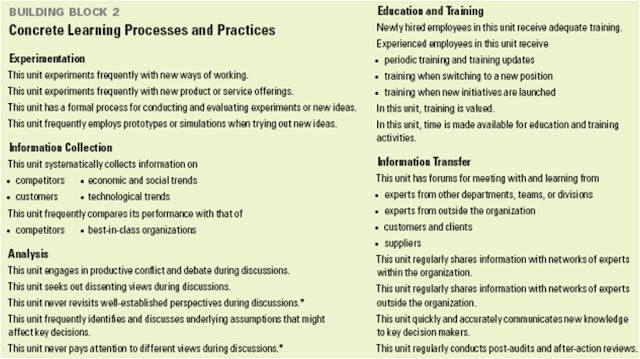

source: UAMS


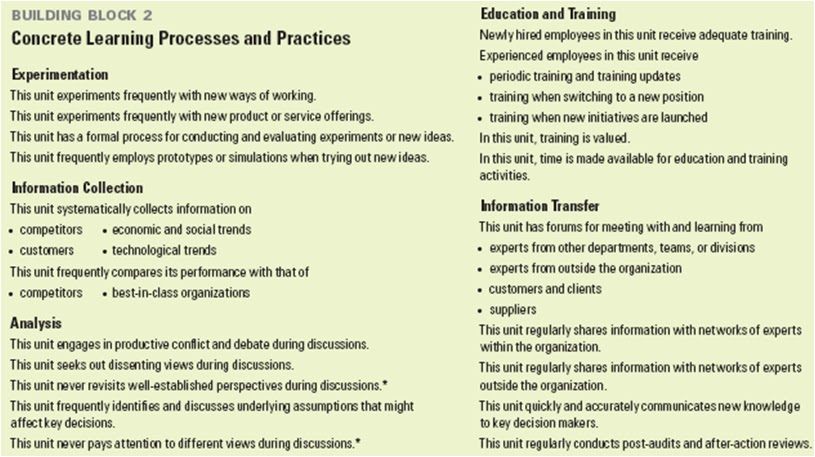

source: UAMS
Friday, 23 July 2010
Social Media Marketing

Social Media Marketing
People connect through social networks more and more; it gives them the possibility to stay in touch with each other and show other people who they are and what they want. By selecting their favorite friends, brands, and communities they create their own online public profile. This profile can be very interesting to brands as they can exactly see who fits in their target group.
Social media ask for a new marketing approach to reach the target group. To be effective, companies should not only be present in social networks, they should also communicate with their target groups and respond to their needs.
Why social media:
• Social media facilitate a dialogue with your (potential) customers
• Companies can learn from the comments of people within the social network and improve their products and services
• 36% of the people think more positive about companies who keep their own weblog
How to set up a campaign
Step 1. You need to define your target groups and social media.
For example, You are a recruiter for IT manager. You will find them at LinkedIn and Twitter and not on Hyves or Facebook.
Step 2. Joining the communities
After selecting the social media look for communities in which your target group is active. On linkedIn the group “IT Manager” and on Twitter #Itmanagement.

Step 3. Interaction
Interact with your potential customer. Make Polls, write interesting articles, ask for information and promote your profile. Your followers are the most important asset in the social media marketing process. They will by your product and spread their experience of your product. Free publicity!
Step 4. Keep informing
The difficult part of Social Media Marketing is to hold the interest of your followers and customers. It’s not a campaign of a week or a month. No it’s an ongoing process that you have to feed with new articles etc.
Most companies lose the spirit after a few months. The interaction slows down and so they lose followers / customers.
Good luck!
Remi
Thursday, 22 July 2010
Friday, 16 July 2010
Twitter made easy
Twitter for dummies!
For all old school people how still think that email is enough in this live.
Here an update!
Thursday, 15 July 2010
How To Make Money From Your Blog
Blogging is hot, but how can you make money form you blog?
Here a nice video about blogging and making money with blogging.
Regards,
Remi
Wednesday, 14 July 2010
Six Digital Trends To Watch by Steve Rubel and David Armano
Check out this SlideShare Presentation:
Six Digital Trends To Watch by Steve Rubel and David Armano
View more presentations from Edelman Digital.
Monday, 12 July 2010
Top trends in change management
Top trends in change management
 Participants in the 2009 study identified the trends they had seen in “change management” in their organization. By nearly a two-to-one margin, the top trend was a greater awareness of the need for change management, mirroring the results in the 2007 study. The second most cited trend, again by a fairly significant margin, was the building of change management competencies across the organization. The top ten trends identified by 2009 participants were:
1 A recognition of the need for change management
Overall, participants saw a greater understanding of and appreciation for the role of change management. Organizations and project-focused employees saw change management as important and as a needed aspect of any change project. Change management was identified as a key contributor to project success. There was a wider appreciation of the role change management played in contributing to return on investment (ROI) and benefit realization of projects; it was viewed as essential. A number of participants also commented on the growing interest and attention by senior leaders.
2009 edition of Best Practices in Change Management
Participants in the 2009 study identified the trends they had seen in “change management” in their organization. By nearly a two-to-one margin, the top trend was a greater awareness of the need for change management, mirroring the results in the 2007 study. The second most cited trend, again by a fairly significant margin, was the building of change management competencies across the organization. The top ten trends identified by 2009 participants were:1 A recognition of the need for change management
Overall, participants saw a greater understanding of and appreciation for the role of change management. Organizations and project-focused employees saw change management as important and as a needed aspect of any change project. Change management was identified as a key contributor to project success. There was a wider appreciation of the role change management played in contributing to return on investment (ROI) and benefit realization of projects; it was viewed as essential. A number of participants also commented on the growing interest and attention by senior leaders.
What participants said:
“Awareness that change management is an important success factor for project management.”
“Growing recognition of importance to successful ROI.”
“Acknowledgement that the investment in change management on the front end of a project will pay off in the end.”
2 Change management competency building
Viewing change management as an emerging and necessary competency moved up from number five on the trends list in 2007 to number two in the 2009 study. Participants indicated more demand for training and knowledge around change management, as well as more widespread competency building programs. Change management competencies were becoming evident in senior leadership levels and front-line management levels.
What participants said:
“Recognition of managing and leading employees as a leadership capability.”
“Growing awareness of relatively new competence.”
“Appreciation of specific change skills.”
3 Dedication of resources for change management
Participants identified the use of dedicated resources focused on change management as a key trend in their organization. Project leaders were more likely to appoint change management resources to support their change initiative, and change management specialists were being identified and developed within the organization.
4 Use of change management tools
The fourth most-cited trend was a greater adoption of change management tools, processes and methodologies. Participants indicated that change management and its application was becoming more consistent and formalized in their organization. The use of more structured and formal processes was number two in the list of trends in the 2007 study.
What participants said:
“The appetite for a methodology is increasing.”
5 Application of change management on projects
Participants commented that change management resources were now sought out by project teams, rather than looking for projects to support as they had done in the past. Project teams were bringing change management resources on board earlier in the project, during the planning phase, and were considering people-side issues earlier. Several participants indicated that change management had become a requirement and that no major projects moved forward without change management.
What participants said:
“We are being asked to join projects rather than asking.”
“People have started accepting the behaviour change as [a] key ingredient for project planning.”
6 Project management and change management integration
Integration of change management and project management moved down several spots from the 2007 study in the list of top trends. Participants commented on the partnership, alignment and involvement in the planning process that was taking place with the project management and change management functions.
7 Change saturation
As evidenced by other findings in the study, organizations were increasingly facing a point of change saturation. The recognition of this condition and an increasing pace of change were highlighted as emerging trends. One participant noted the “change avalanche” the organization was experiencing.
8 Standard change management approach
More organizations were establishing a standard change management methodology for the entire enterprise.
9 Establishment of a change management group
Some organizations were creating and staffing a change management function in the organization, sometimes called the Change Management Office (CMO). Advances were made in staffing this group which centrally supported change management and change management training efforts. A number of participants indicated they were currently trying to decide where this group would reside in the organization.
10 Management of the portfolio of change
Several participants indicated that their organizations were making progress in understanding the people impact across the multiple projects underway. Participants mentioned steps including managing the portfolio of change, tracking projects, mapping future changes and prioritizing projects based on the change load.
Prosci's 2009 edition of the Best Practices in Change Management benchmarking report is the most complete body of knowledge available on change management. The 2009 study is the sixth benchmarking effort Prosci has conducted over the last twelve years. The objective of this study is to uncover lessons learned from practitioners and consultants so current change management teams can benefit from these experiences - it is a forward looking, action-oriented report aimed at improving your change management work.
This tutorial shares the top ten trends in the field of change management. The list of trends in the 2009 study was similar to those in the 2007 study. The number one trend remained the same - but the the number two and three trends in the 2009 study moved up significantly on the list compared to 2007. This tutorial shares the top ten trends and a simple assessment you can use to evaluate how well your organization is tracking with the trends.
Monday, 5 July 2010
Creating an Innovation Mindset
Creating an Innovation Mindset
Uit onderzoek blijkt dat het succes van bedrijven in tijden van een resessie mede wordt bepaald door deinvesteren in innovaties. Maar veelal is dit juist het eerste waarop managers bezuinigen. Dus hier een wijze les.
Misschien helpt dit filmpje de mindset te beinvloeden of misschien te veranderen!
Uit onderzoek blijkt dat het succes van bedrijven in tijden van een resessie mede wordt bepaald door deinvesteren in innovaties. Maar veelal is dit juist het eerste waarop managers bezuinigen. Dus hier een wijze les.
Misschien helpt dit filmpje de mindset te beinvloeden of misschien te veranderen!
Subscribe to:
Posts (Atom)